
 Sales :
  Email :
Summarize this article using AI
Summary
Bolt is the artificial intelligence (AI) agent inside TransImpact’s Supply Chain Planning and Transportation Spend Management products. For transportation costs, Bolt keeps your carrier invoices and claims moving, explains what drives your parcel costs, and points you to savings. For the supply chain, Bolt explains your forecasts and the supplier risks that need attention.
Key takeaways
- Bolt retrieves your new carrier invoices, files claims, and gathers your alerts in one place, so you know when invoices arrive and what needs attention.
- The AI agent knows published carrier rates, weekly fuel surcharge history, and annual rate changes, so it can explain why your costs went up.
- They work on specific savings problems, such as making address corrections, on your schedule, delivering a finished analysis with the fixes to make.
- Bolt also explains why each supply chain forecast method was selected, walks you through building reports, and answers questions such as which suppliers put your plan at risk.
- You can ask Bolt questions in plain English, and every answer comes from your own data, within the access you already have.
Your transportation and supply chain data grow with every shipment and every forecast run, and the questions they raise rarely wait for a report. Bolt assists by asking questions like: Why did your cost per package go up last month? Which supplier is putting your plan at risk? Where are the savings your team has not had time to find?
What is Bolt?
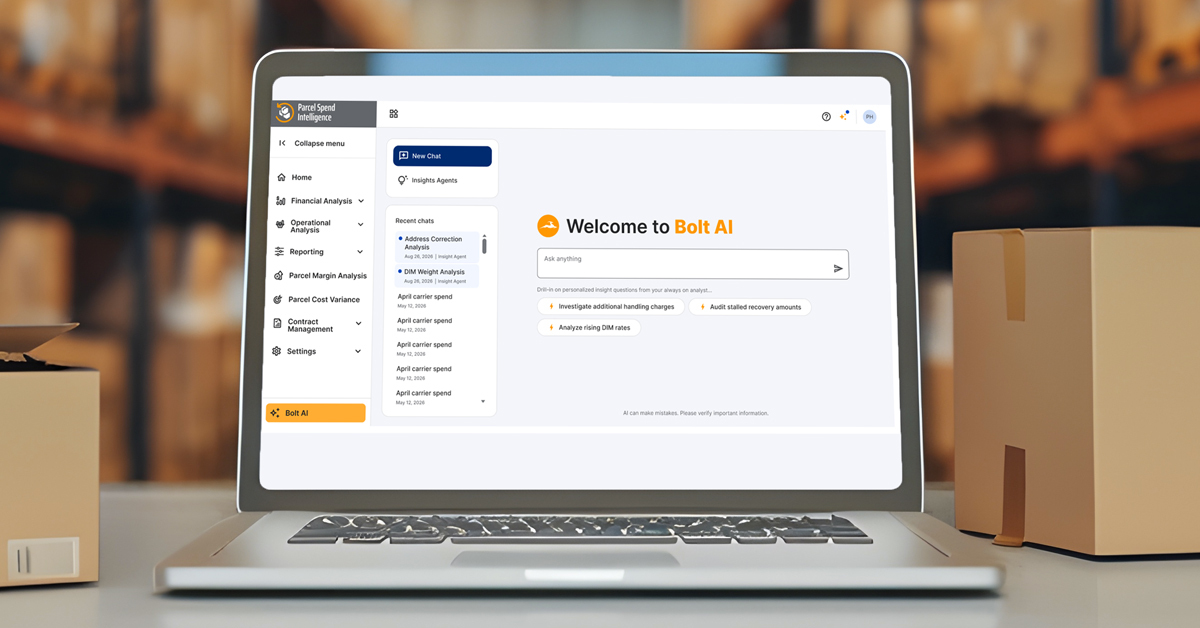
Bolt is the AI agent built into TransImpact software, so one conversation can cover both your transportation data and your supply chain data. It works across your records in both applications and understands how your data is organized, including the definitions and calculations behind it. Beyond answering your questions, Bolt runs as an agent, so it can pull data, run multi-step analysis, and run on a schedule. Bolt also works within the permissions you already have and answers only from your own data.
How does Bolt keep your invoices and claims moving?
Bolt takes on three routine jobs:
- Invoice retrieval: Bolt retrieves your new carrier invoices and lets you know when they arrive.
- Claim filing: When a package arrives late, or a charge does not match your contract, Bolt files the claim and tracks it.
- Alerts: Bolt pulls your alerts into one place, so you can see what needs attention today.
How does Bolt know what you should have paid?
Your invoices show what you paid, and Bolt knows what you should have paid. Bolt brings three kinds of carrier context to your invoices.
|
Carrier context |
How Bolt uses it |
|
Published carrier rate guides by service, zone, and weight |
Compares what you paid with what you should have paid |
|
Weekly fuel surcharge history |
Matches fuel charges to the week each package shipped |
|
Annual rate and surcharge changes |
Traces a jump in costs to the right cause |
When your fuel surcharge costs jump in a given month, Bolt compares the published weekly rate with last year and separates the rate effect from changes in your volume and shipping mix. You know whether you're seeing a carrier pricing change or a change in how you ship.
How does Bolt find savings before you ask?
Bolt reviews your shipment data every week for savings, trends, and opportunities. What changed appears on the Bolt home screen as a question you can open with one tap. When you open one, Bolt runs the analysis and shows every step it took to reach its answer, so you can check its work and decide what to do next. You start each week knowing what changed.
What do Bolt agents do on a schedule?
Bolt agents are built around specific savings problems, with the way our analysts work those problems built in.
How do you set up a Bolt agent?
Each Bolt agent runs on settings you choose:
- The review period Bolt analyzes
- The comparison period Bolt measures against
- The schedule Bolt runs on
- Any instructions you want to add
Bolt then runs on that schedule, finds the repeat offenders, and delivers each run as a finished analysis with the fixes to make.
How does the Address Corrections agent work?
The Address Corrections agent looks for the receivers whose addresses carriers correct most often, estimates the savings tied to fixing them, and creates a file you can send to your source system to correct those addresses. Your team reviews the findings and decides what to act on.
What can Bolt do for the supply chain?
Bolt knows your data model, your field and category definitions, and the forecasting methods available to you. That knowledge supports two kinds of help:
- Forecast explanations: Bolt has context on each forecast run, including the data that went in and your history then. You can ask why a forecast method was selected and get the reasoning without submitting a support ticket.
- Report building: Bolt recommends the steps to build the report you want, so you can build it faster and with more confidence.
What can you ask Bolt?
You can ask Bolt about your parcel costs, carrier performance, forecasts, and suppliers in plain English, with no report builder, filters, or query language. Here is how Bolt handles five example questions:
- Why did my cost per package go up last month? Bolt separates volume from rate, then looks at your zone and weight mix to show which change drove the increase.
- How did my carrier perform on time in transit this quarter? Bolt measures performance against the carrier's delivery commitments, like a lane-by-lane breakdown when you ask.
- What are my top savings opportunities? Bolt returns a ranked list you can question further.
- Which suppliers have the worst on-time performance over the last six months? Bolt identifies those suppliers and the items their delays put at risk.
- Which 10 items and locations should I look at this morning? Bolt returns a prioritized list with the reason for each.
Every answer comes with the reasoning behind its numbers, so each follow-up question takes you deeper.
How can you see what Bolt can do for you?
Your carrier invoices hold answers your team has not had time to find, and Bolt is built to find them every week. Our parcel team can walk you through how Bolt explains your costs, points you to savings, and handles your invoices and claims. Request a call with our parcel team to see what Bolt can do for you.
FAQs
Who has access to Bolt?
Bolt is available today to any team with an active transimpact account. You open Bolt from the main navigation inside the application.
What data does Bolt use?
Bolt answers only from your own data, and it works within the permissions you already have.
How do I get better answers from Bolt?
Be specific about the time period, such as last month, the third quarter, or year to date, and name the carrier, customer, item, or location you care about, using the names your team uses internally. Bolt does not know which page or filters you have open, so put those details into your question. The follow-up questions are where the most useful answers come from, so keep asking.
Who decides which fixes to make?
Your team decides which of Bolt's recommended fixes to make. Every analysis Bolt runs shows the reasoning behind it, so your team can check the work before acting on it.